Hacker Newsnew | past | comments | ask | show | jobs | submitlogin
Tell HN: Today Is Global Accessibility Awareness Day
202 points by bcx on May 18, 2023 | hide | past | favorite | 61 comments
As builders and creators we want to maximize our impact. There's a lot of talk about ESG (Environmental, Social, and Governance). Which for most us is pretty abstract and something only really big companies invest a small % of their revenue into to attract certain kinds of investors (there are exceptions).

One way we can all directly make impact is making a commitment to make our software accessible to all, starting with educating ourselves about common mistakes folks make when designing UI that produce software that can't be used by folks who have temporary or long term low vision, low hearing, neurological, and other disabilities.

There are a ton of free educational events on accessibility going on today, and if you don't have time today, find a recording, or listen to a podcast, there is a huge opportunity to make impact once you better understand the challenges.

A couple of years ago while doing research on accessibility I came across the Global Accessibility Awareness Day, and the GAAD foundation (https://accessibility.day/) - there are many such orgs, but if you consider yourself accessibility curious, today's a good day to get curious.

/PSA


Accessibility is easily overlooked but in my opinion provides a much more direct and widespread impact than the mentioned ESG - and often provide value to more people than originally intended - I'm thinking of subtitles in videos that immensely helped me learn English, and public infrastructure adaptations for wheelchair users which also greatly benefit others - like mothers with strollers.

I wish more things were designed with an accessibility-first mindset - enabling edge cases might seem like overkill at first, but it could bring unforseen advantages.


I think the elephant in the room is that in many cases, the only way to improve accessibility beyond a fairly low point is to lower the utility.

A good example of this is tables. Tables are amazing at conveying large amounts of complex data in a very intuitive way. Not only that, it's great at manipulating data as well. It is not without reason Excel is powering a significant portion of the business world, and try as many startups have, it's very hard to pry Excel out of the hands of people who are using it. Excel is extremely versatile and very good at what it does, owing largely to the table metaphor.

Problem is that tables are also not very accessible. Among other things, they all but require sightedness. They also don't really work on mobile in any practical sense. At the same time, any accessible alternative to large tables are a strict utility downgrade for people who are able to partake in tabular data.

Starting with an accessibility first design principle, it would not be possible to produce something like Excel. We'd be stuck with a hell consisting of a million mobile apps, one for each conceivable workflow and task, rather than having one tool that can be made to perform any data manipulation task.


1. "Accessibility" means more than just "blind people can use it."

2. "Tables" are primarily for static tabular data (but not exclusively). Excel is a "spreadsheet," a grid of interactive cells.

3. While accessibility is best thought of as an aspect of usability, the practical limitations of tables or spreadsheets on phones are usability problems for everyone, not just for people with disabilities. It's more about the touch interface than what you can see on the screen; a modern phone can display a lot more than the monitors used for the first spreadsheet programs.

4. While having vision can make it more efficient to take in and understand a lot of information in a table or spreadsheet, a screen reader user can navigate them in two dimensions if they're made correctly. Excel's core functionality is useable with a screen reader though not every single feature is.

https://support.microsoft.com/en-us/office/screen-reader-sup...


I'll try to reiterate my point:

One of the most useful desktop applications uses a metaphor that is among other things, fundamentally incompatible with mobile devices, and also all but useless for blind people.

It's also important to note that Excel's value is not primarily as a presentation format, but a data transformation tool. Its strength is that it permits the user to define ad-hoc tables and then proceed to transform that data in completely arbitrary ways.

Adopting an accessibility first mindset, you can design software that does not use such a metaphor, enabling it to be accessible on mobile and for people who aren't sighted, but such a design would exclude a lot of the utility of Excel, since almost all of its utility comes from the grid metaphor.

> While accessibility is best thought of as an aspect of usability, the practical limitations of tables or spreadsheets on phones are usability problems for everyone, not just for people with disabilities. It's more about the touch interface than what you can see on the screen; a modern phone can display a lot more than the monitors used for the first spreadsheet programs.

This isn't actually correct. Modern phones have very high resolution, but also very high DPI. The amount of (readable) text is very low, even compared to an old 15" CRT on which you could read a 8x4 pixel font without much trouble.

No matter how high the resolution is, the fact of the matter is that a mobile phone is generously half the size of a page in a paperback. Even an old, small computer screen was the size of full two pages, if not more.


Maybe in some cases. I think it's a creativity issue. In an ideal world the utility can be preserved or increased, with the use of an innovation that improves significantly the life of the functionally varied, with secondary effect of reducing for example cognitive strain on the original user. There may challenges in mindset, funding, time, organisation, lack of understanding or empathy, and so on, for this to be reality. But I would argue that there is a flow of unforeseen benefit from the user that requires a feature, to users that don't require a feature but reduces time and energy spent on getting something done just because the path is shorter, easier, friendlier. Personally I have used many accessibility features as part of small productivity hacks. I also think the study of for example UI accessibility doesn't only apply to the functionally varied but also makes life easier for any user.


If you ignore all the cases where a statement is contradicted, any statement appears true.

Ultimately the visual medium permits random access 2D representations of information that just aren't viable in the sequential-access 1D medium of speech / small screens.

Sometimes accessibility improvements are to general benefit, but this isn't universally true.


You claim utility first and accessibility as first principle removes utility. Removes utility for who? Accessibility is all about utility for the groups who need it the most. You can have normal excel and an excel that uses sound for blind people on the side. It's not one or the other, and the other in this case also puts utility first for the people it applies to. And what you learn from that can make normal excel better too.


> Accessibility is all about utility for the groups who need it the most

Do some groups really need utility more than others? This seems to contradict the idea of accessibility in general.

> You can have normal excel and an excel that uses sound for blind people on the side. It's not one or the other, and the other in this case also puts utility first for the people it applies to.

It really is one or the other. You cannot represent an effectively infinite 2 dimensional grid in speech. This is impossible because speech is one dimensional. This 2d grid is not accidental to excel, it's at the core of its utility.


Some people need help and it's a positive sum game to help. You have misconstrued me.

>Do some groups need really utility more than others?

Some people have a lot of utility at hand, and some people who have no utility at all, we can do some stuff so they also can use a tool.

>It really is one or the other. You cannot represent..

The 2d grid is stored in computer memory. You don't need speech to store it. Speech is just a communication medium. A lot of accessibility is just altering the communication medium. It has columns, rows, things that are described with words. You can index into the grid. It is true that sight is a good thing, but your total refusal to provide features to those with alternate needs is ableist. It doesn't matter if the visual component is the original source and I agree excel couldn't have been created without sight. Clay tablet accounting couldn't be created without sight. Doesn't mean you can't use other senses when something has been created. Why the refusal to share? It's pointless not to share. An ending note: Leonhard Euler was rather productive while blind.


> Some people have a lot of utility at hand, and some people who have no utility at all, we can do some stuff so they also can use a tool.

Right, but the point is that we all need the same utility, right? Some people may presently have less utility available, but surely the goal is for the utility to be the same?

> The 2d grid is stored in computer memory. You don't need speech to store it. Speech is just a communication medium. A lot of accessibility is just altering the communication medium. It has columns, rows, things that are described with words. You can index into the grid. It is true that sight is a good thing, but your total refusal to provide features to those with alternate needs is ableist. It doesn't matter if the visual component is the original source and I agree excel couldn't have been created without sight. Clay tablet accounting couldn't be created without sight. Doesn't mean you can't use other senses when something has been created. Why the refusal to share? It's pointless not to share. An ending note: Leonhard Euler was rather productive while blind.

Enough allusions to a nebulous solution that must surely somehow exist. How would you represent Excel to a user that is not sighted? A spreadsheet is not just a table, it's tables within tables. The data is scattered in tables around the sheet and inconsistently surrounded by areas of empty cells, the data is ad-hoc and user created and can not be assumed to have any standard headings or type annotations as many spreadsheets just don't. Unrelated tables may also be adjacent to each other within the sheet. A row of empty cells may be semantically meaningful, or just the space between two different tables. There may or may not be headings or column labels. Any cell may be represented both as a formula and a value. Formulas may refer to any cell both within the sheet and within other sheets in the workbook. It's as truest digital equivalent of unstructured writing with pencil on a blank sheet of paper.

Many of the things that make this a complete accessibility nightmare are the same things that makes it an extremely versatile and high-utility tool for abled people. The complete lack of structure and freedom to invent completely ad-hoc work flows that may or may not resemble structured data is exactly what makes it so incredibly powerful.

My entire point I've been trying to make is that there is an inherent conflict here. Pretending like it doesn't exist doesn't make it go away.


>Enough allusions to a nebulous solution that must surely somehow exist. How would you represent Excel to a user that is not sighted?

A voice presents the information structurally top-down recursively as needed. That's it. Braille displays may also be used. If the excel is unstructured, an inclusive organization makes sure such files are documented. Soon an LLM may describe the structure. And don't underestimate peoples intelligence if they happen to be alone without documentation, structure can be extrapolated. Let's not pretend things are impossible that aren't. A simple screen reader gets a lot done here.

>surely the goal is for the utility to be the same?

Not for the methods to be the same, the goal is for the output to be the same. To consider the majority's way of doing things the correct way is sort of discriminatory. To cram people with different needs into an existing framework doesn't always work, rather you have to meet their needs so they can provide the same value in alternative ways.

I like your point excellent job you're right of course it's a difficult problem. I won't be able to reply any longer. I hope you may generalize an appreciation of the willpower of people with functional variations and not try and fit them in a mold rather give them alternative interfaces that they need to produce the same results


> I think the elephant in the room is that in many cases, the only way to improve accessibility beyond a fairly low point is to lower the utility.

They did this on Windows and on Android. It didn't work. Try resizing a window on 4k screen in win 10. Or try to get rid of an error message in Android 10 (hint: there is no Ok or Cancel button and the error message obscures other UI elements).


Regarding prioritizing - I feel Accessibility is in battle with Denial.

- Have you also witnessed your product-business / employer ignoring user pain to chase MVP?


So look at this as changing the definition of what “minimum viable” means in your organization.

Maybe you can make the case for why every link and image should have aria tags, since it’s a new app and assets are more likely to be missing.

Or maybe you know that keyboard controls need to be implemented, but you didn’t consider focus trapping for assistive users.

Accessibility isn’t a binary, but a sliding scale. At the top of the market you get insanity like WCAG AAA, which straight up invalidates most of the modern web because it’s so restrictive.


I mentioned to a police officer recently that pounding on someone's front door while yelling "Police!" doesn't always succeed in communicating. Some people are hard of hearing. Some get distracted by the noise and therefore can't hear the words (they may have their own noise on their side of the door). Some have a fight/flight/freeze response to any loud noise, regardless of the context, and can't think straight.

I figured he'd be interested in suggestions on how to raise the likelihood the occupants would know it's the police and not some gang bangers. Especially since it could save lives on both sides of an incident, including his.

He wasn't personally interested in yet another thing to carry/deploy/remember when he knocks on doors, and said we can't worry about every "edge case". Whatever I said, he tended to push back.

But after I pressed him some more, he said I could email a suggestion to my state's peace officer standards and training "POST" org. (usa)


There was a story back in the 90s about a Japanese guy who didn't understand what was meant when a cop yells "Freeze!" and was shot dead by police because of it.

We really have to train new attitudes into our police, starting with the idea that as peace officers, their first priority is to keep the peace, like "first do no harm" for doctors, and not roll into every situation expecting to get a chance to be Dirty Harry.


What could be done instead?


I don't know but something involving light (perhaps the police color of blue) would help.

Are there laws about sticking something under a door?

There are hockey-puck sized devices you can attach to surfaces, which can turn them into speakers. Perhaps you can make clearer, calmer announcements compared to yelling, especially if the device can take a second to calibrate itself against the material. Once it's attached, your hand is free to do something other than knocking. And the device can play some standard announcement, so your voice is freed up as well to communicate with other officers or whatever.

Yes such a device wouldn't be cheap, but if I were an officer and there's a risk of being misunderstood, I'd be interested.


Love this! We had a department-wide meeting where we showcased a usability test with a participant using a screen reader. Had a lot of engagement and was enlightening of the many issues screen reader users face when navigating relatively straight forward web pages.

A good ethos for accessible design is that making designs accessible and inclusive often the raises the bar for the average non-disabled user.

99% invisible has a good podcast on this with the development of the curb-cut. Oriignally it was for wheelchairs but it turns out to help parents with strollers as well!

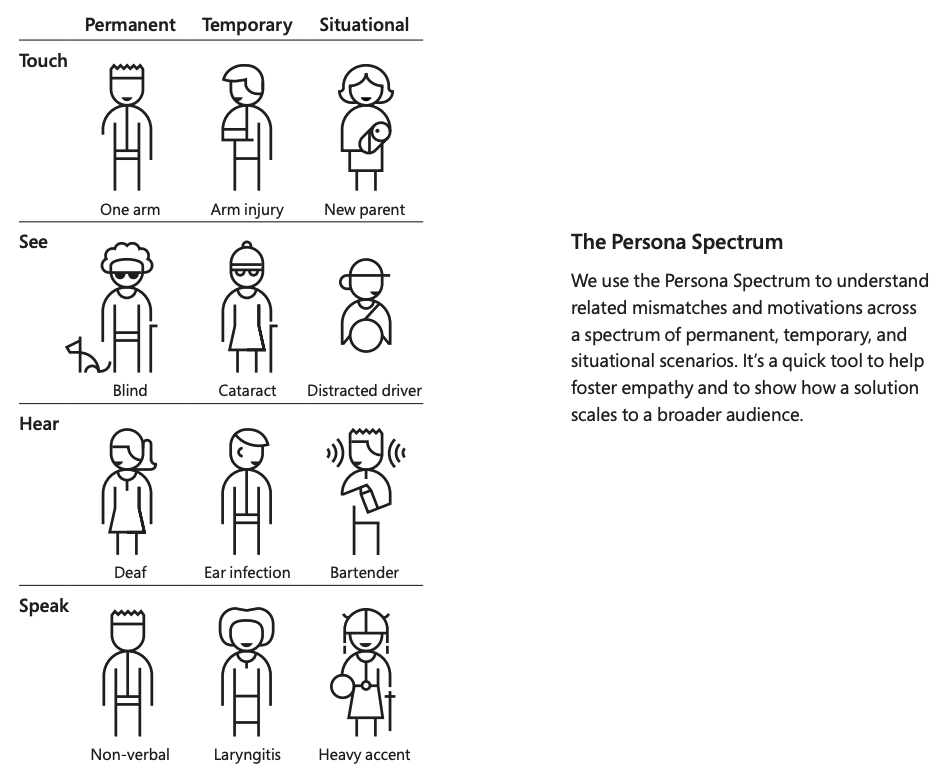
Also love to point to the disability persona spectrum. Shows how disabilities can vary from permanent, temporary, and situational. I think the Microsoft's Inclusive Design Toolkit is partly responsible for it (but doesn't appear in the deck).

- https://99percentinvisible.org/episode/curb-cuts/

- https://infinum.com/handbook/img/accessibility/Persona_spect...

- https://scope.bccampus.ca/pluginfile.php/52293/block_html/co...


Yes AND!

It's pretty amazing what you can accomplish with a philosophy of progress over perfection, the right framing, and some specific goals.

I'd challenge you all to set some public goals for accessibility (even if they are small) (for ideas: you could see what we've been doing, see: https://www.linkedin.com/pulse/olarks-accessibility-journey-... , which links out to the goals and results for the past 3 years)

and then check back on them in a year. NOTE: if you are inside a bigger org, odds are you won't be able to post it super publicly, but at least write them down somewhere and come back to them to check progress, and set goals for the next period.


Accessibility is for more than just disabled people!

I've recently had surgery on my shoulder, and have to have my left arm in a sling with no use for 6 weeks. I've made heavy use of my phone's one handed mode, and window's sticky keys

When my partner goes to bed at night, I can keep watching Star Trek TNG with subtitles.


You’re a disabled person then. Sure, you’re temporarily disabled rather than permanently, but that doesn’t matter.

One lens for looking at disability is that a disability is a system’s inability to cope with a particular user’s set of needs.


Yes, for my first example, I am temporarily disabled in regards to my arm, but my hearing is just fine. Accessibility for subtitles still helps me.

I think the classic example of accessibility being better for everyone is the ramps at crosswalks. They help people with wheel chairs, they let blind people know they're walking into a crosswalk. But they also give people more traction, or help people with strollers move around.


Right. Disability seems to convey a negative still, much like there's something missing and it's a bad thing. There is a study that said a majority of disabled people with invisible disabilities would never identify publicly as disabled. So I'm willing to bet most of those people don't take to the idea that having a disability is more of a social issue then anything else.


This is so true. I once saw a diagram[1] in an accessibility training that drove this point very well for me. You don't need to have a disability to appreciate accessible software.

[1] It looked like this: https://www.coursearc.com/wp-content/uploads/2023/03/Persona...


Yeah, it's not all about permanent disabilities, it's also about temporary and situational ones (like say, having your hands full due to work, or being in an area which isn't well lit and needing better contrast).


> When my partner goes to bed at night, I can keep watching Star Trek TNG with subtitles.

Don't take this as a snarky remark, but why are subtitles the solution to this over headphones?


Lot harder to hook headphones up to a sonos surround sound system than it is to just mute it and read subtitles.


Yep. And anything that makes a website easier to use with a screenreader, also makes it easier to write addons that enhance the UI for everyone.


Frankly, every web developer should be excited about accessibility. It's not just about obscure tag attributes that are invisible to most users. Following the WCAG will actually make your design better by guiding you towards text with sufficient contrast, and to not neglect to add labels to form inputs, etc.


Agreed. But to be fair, it's not developers calling these shots. Unless it's a priority of leadership, management, product managers, project managers, etc. then it's not going to be a priority of the dev team.

Sad, but true.


If you are UK based there are certain requirements that leadership down should be aware of, https://www.gov.uk/service-manual/helping-people-to-use-your....


I worked for a US government contractor. According to US law, any software we sold to the federal government has to make accessibility a primary concern. The company never paid more than lip service to the idea. (The closest we ever got was showing that a particular screen reader _could_ make sense of a very very small part of the application.)

Eventually the company was sued by a former user who had been fired from a US government job for low performance when using the company's software. The company settled out of court for some amount of money, but never changed the company policies. To my knowledge, that company still doesn't take accessibility seriously despite the law and despite having settled at least one court case about it.

Perhaps the UK is able to enforce their requirements in a way to actually cause changes in behavior, but it wasn't the case in the US in the 2010s.


I had a quick look, and it appears we are in a worse state with regards to this, zero enforcement actions, ever...


that said, the UK Gov website is amazingly well built, and I guess the law is used to 'nudge' orgs so maybe there is some purpose to it, I would happily see more action here, starting in '96 I ran an accessibility first web design company, my key takeaway was that the more accessible your site, the better indexed it would be by search engines, so I sold my clients on the idea using that bait :)


If we, as developers & designers, focus on the sexiness of accessibility, it might popularize those features, internally.


It might. But unless we control estimates, budget and/or burn rate, the needle isn't going to move.


> educating ourselves about common mistakes folks make when designing UI

The main issue I see is that most devs simply do not care, and/or dev management not prioritizing it unless required by regulations.

The biggest problem I see is that isn't likely ever going to change.


One way to combat this is to reframe disability/accessibility as universal design or inclusive design. Then refer to the many ways that approaches, features, and tools that make a product more accessible can also improve overall usage metrics or other KPIs.

In the olden days, people referred to the "curb cut" — the smooth cutout at the edge of a curb that allows a wheelchair user to traverse from street level onto the curb. This turns out to be useful for UPS drivers with dollies, parents with strollers, and many other users as well.

In the digital world there are other examples, including better SEO ratings for websites that have proper accessibility and can be more accurately parsed by web crawlers.

I've found that if you present both the accessibility benefits and the business benefits, you can make a lot more progress than if you just rely on one or the other.


Thanks for sharing! I will look at these resources. Our app is made for people that definitely have vision (it enables doctors that read EEGs) but we can still improve for other levels of accessibility.


I think the open source community has failed screen reader users. You cannot use Linux with a desktop environment without major accessibility issues layered throughout. It’s particularly frustrating when bug reports are ignored for years and are never fixed at all. This is why I continue to prefer windows or macOS over linux.

Stuff like Jupyter notebooks are also not accessible, making it a little bit harder for visually impaired people in stem


I've started training myself on Emacspeak, so if my vision ever goes away or is severely compromised, I am still able to operate (and write programs for) a computer. I found it pretty amazing that I could write and test a short program with my eyes closed. Emacspeak is an outlier in the open source ecosystem when it comes to accessibility, however, and that's to everyone's detriment. It comes from an old-school Unix mentality of "let's write programs in such a way that loosely coupled bits and bobs can be attached and integrated to suit custom needs" rather than the GNOMEish "we've already thought of the common case and developed a comprehensive solution, you will use it and like it, fuck your obscure little corner cases".


Hadn't heard about them until today and saw where they released a thoughtful rap song. Can only find it on youtube haven't seen it on Spotify yet but I teared up. https://www.linkedin.com/posts/jennison_accessibility-daze-a...


Question, why is this different than a proper usability study? If I am not mistaken, Jacob Nielsen has been proselytizing this for decades.


Accessibility is the lynchpin of my current work-- I'm applying for a UK Global Talent Visa to create pro-bono mobile apps for people with cognitive/motor/vision impairments. Accessibility improvements can have enormous benefits for people in need.

See BoldContacts.org, and you can email me at joel@joelparkerhenderson.com. I'm seeking help with app dev, healhcare outreach, and the UK visa.


There are GAAD gatherings in various cities, and online gatherings. You can browse the listings here, [1] and in future you can also submit your own gathering to be included as well.

1: https://accessibility.day/events/


Any decent enterprise oriented (datatables and similar controls) UI frameworks, that have decent accessibility? JS framework agnostic solution is more welcome, but ReactJS or VueJS frameworks are welcome too.


I wonder when LaTeX accessibility is fixed


So who comes up with all these [X] days?


I was curious too. Joe and Jennison started GAAD 12 years ago from a discussion on a forum/blog post (https://accessibility.day/about/). So I suppose if you want to put 10 years into trying to get something mainstream, you too could start a day for something that folks weren't paying enough attention too ;).

That said, I'd say Global Accessibility Awareness Day is mainstream enough at this point to be called out, given that it's being mentioned at the bottom of Apple's press releases for accessibility (https://www.apple.com/newsroom/2023/05/apple-previews-live-s...)


The reality is to keep up with all this is a waste of time for most small and medium businesses.

Unfortunately there are more customers who aren't handicapped.


I'd challenge you to expand your understanding of disability and ability.

Small and Medium businesses "waste time" on all sorts of things, one anecdote that might help your libertarian leanings is that majority of disabilities are age related, and the majority of the wealth is controlled by older folks who are far more likely to just not spend money at said small/medium business without providing any feedback to said inaccessible business.

In general, I might look at the "curb cut effect". Curb cuts are those things you see on sidewalks that let folks roll bikes, carts, strollers, walkers, and even wheel chairs when cross streets. You might take for granted that the build environment for folks is far more accessible than it was in the 80s pre ADA.

My philosophy is well designed systems fully embrace the constraints and benefit everyone.


This is false, because accessibility helps everyone. There are examples of customers who are temporarily impaired being assisted by options for people that might have only partial use of one hand, or options for colorblind people improving the overall design of your site.

For example, there are still games created which do not support button remapping because why would they? It's an accessibility option, they don't need to support 'everyone'. But I, as someone who is not disabled, use it because it allows me to make the controls more comfortable.


Consider that everyone who ages will someday require accessibility features. I suspect most developers will eventually find themselves wishing they had created a more accessible world.


As someone with limited vision, I agree. The actual solution is enabling system-wide tools to work around the non-accessibility-aware applications.


For people with more accessibility expertise, why instead of pushing all websites to be accessible, there's no push for a better accessibility AI? I would imagine that having a better interpretation model, implemented by a couple of tech giants, would be a more productive use of our time than ensuring that all aria labels are in place? Is it because nobody is working in this problem space? It sounds fairly straightforward problem to solve, comparing to some recent achievements.


It's been tried. See accessibility overlays. And they all suck.


We have tried neural nets before as well. But technologies and constraints are changing. I just took a screenshot of the Facebook feed, and segment-anything model was able to identify most of the elements, even without proper fine-tuning. Scrapping billions of elements with classifications is also something fairly trivial.

I, perhaps naively, think that training a better model(s) that helps with accessibility is a much better path forward for users that need it. Just a genuine question, not sure why I am getting downvoted. By no means, I am implying that this is not important.


Guidelines | FAQ | Lists | API | Security | Legal | Apply to YC | Contact

Search: